

The workflow, from lead to payment

Tree Service Software for the Work Between Jobs

Quote the work, plan the visit, keep the customer informed, and send the invoice. Built for stump grinders and small tree-removal crews who handle their own customers.

Use your own services and prices for removal or trimming. For stump work, add the built-in estimator and optional AI photo assist.

Explore job scheduling, estimating, and reports, or review the $39/month plan.

Create your first estimate in minutes.

Start free. No credit card required.

Start free with Google Create your free account

14-day free trial No credit card required $39/month after trial Cancel anytime

Built by a stump grinder for stump grinders and small crews.

Built by a working stump grinder at Root Force Stump Grinding

More details

What Is Tree Service CRM Software?

A tree service CRM (customer relationship management) system is software that helps tree service and stump grinding businesses keep track of leads, customers, photos, estimates, jobs, schedules, messages, and invoices in one place.

Generic CRMs focus on sales pipelines, marketing campaigns, and call centers. A tree service CRM focuses on who the customer is and where the work is, what photos or notes they sent, what you quoted and what was approved, when you’re going to the property, and whether you’ve been paid.

Tree Service Software is tree service CRM software built around this reality. It connects lead forms, customer records, estimates, jobs, visits, messages, photos, and invoices so you can run jobs from start to finish without spreadsheets, sticky notes, or digging through your personal phone.

How Tree Service Software Fits the Way Tree Crews Actually Work

Tree Service Software is designed around the way tree crews and stump grinding outfits run their days — on jobs, not behind a desk.

Missed calls and photo leads stay connected

The front end of the job should not live in a separate tool:

  • AI Receptionist can answer missed calls with your message.
  • Customers can be texted your lead form automatically.
  • Photo-capable lead forms collect job details, access notes, and customer photos.
  • New leads, tags, alerts, and photos stay tied to the customer record.

The customer does not go cold just because you were working, driving, or already on another call.
Estimates, jobs, and invoices in one connected workflow

Instead of separate tools for quotes, jobs, and invoices, Tree Service Software keeps them in one line:

  • Create and send an estimate.
  • Customer approves it by text or email.
  • Convert the approved estimate into a job.
  • When the work is done, prepare and send the invoice from the same record.

No retyping, no rebuilding quotes in Word or PDFs, no guessing what was agreed to when you get back to the office.

Job details and notes designed for field crews

Each job keeps the information crews actually need:

  • Work description and line items.
  • Photos of the work area or stump.
  • Notes and internal notes.
  • Attachments and documents tied to that job.

It’s easy to see what was quoted, what was done, and what still needs attention.

Tree service scheduling that stays with the job

Scheduling isn’t a separate calendar. Visits stay connected to the job they belong to:

  • See upcoming work at a glance.
  • Assign visits to crew members.
  • Track job timing and status.
  • Keep the schedule anchored to the actual job, not a generic calendar entry.

See job planning and weather warnings

Core CRM Features Built Around Tree Service Work

You don’t need every feature CRM vendors can dream up. You need a few things done right.

Built in estimating for tree work and stump grinding

Create professional estimates quickly, whether you’re removing a tree or grinding stumps:

  • Line items and adjustments designed for tree work.
  • Photos attached directly to the estimate.
  • AI photo assist can suggest stump details from customer-submitted photos.
  • Customer visible messages and PDFs for approval and records.
  • Move to invoicing from approved estimates and send a payment link from the same workflow.

Two way texting and messaging with customers

Tree Service Software includes two way messaging so you’re not hunting through your personal phone for job conversations:

  • Send estimates by text or email from the CRM.
  • See when messages are delivered, opened, and approved.
  • Keep customer replies and photos attached to the estimate or job.
  • Stay on top of response deadlines with one-thread reminders and alerts.

Simple customer records without CRM clutter

Customer management is built for field work, not sales contests:

  • Contact details and multiple service locations in one place.
  • Address suggestions for U.S. and Canadian customers, service locations, and invoice bill-to details. Review before saving.
  • A history of estimates, jobs, invoices, and messages.
  • Enough detail to run jobs well, without turning your CRM into a data entry project.

Keeping photos, notes, and documents attached to the job

Tree work is visual. Tree Service Software keeps what you capture on site connected:

  • Photos taken in the field stay tied to the estimate or job.
  • Notes and internal notes help crews know what to look out for.
  • PDFs and documents live with the customer and job records.

Tree service scheduling software

Plan the work. Keep an eye on the weather.

Whether it’s a day of stump stops or a tree removal with several visits, keep the date, location, and assigned people connected to the job.

Put work on the calendar

Add a Quick Job or drag an existing job to a date in Job Planner. Assign visits to your team and preview route maps.

Check the job’s forecast

See a heads-up for daytime thunderstorms or a high chance of precipitation at the service location. Move the job if needed; the warning doesn’t block scheduling.

Keep the details close

Use address lookup when adding work, then keep access notes, photos, and customer messages with the job instead of in separate conversations.

Weather is available for U.S. locations, roughly seven days ahead. It’s a planning aid, not a safety alert; no warning does not guarantee dry or safe conditions.

Reports that show what is getting sold, paid, and still outstanding

When you want more than a quick dashboard glance, Reports gives you a cleaner place to review how the business is performing.

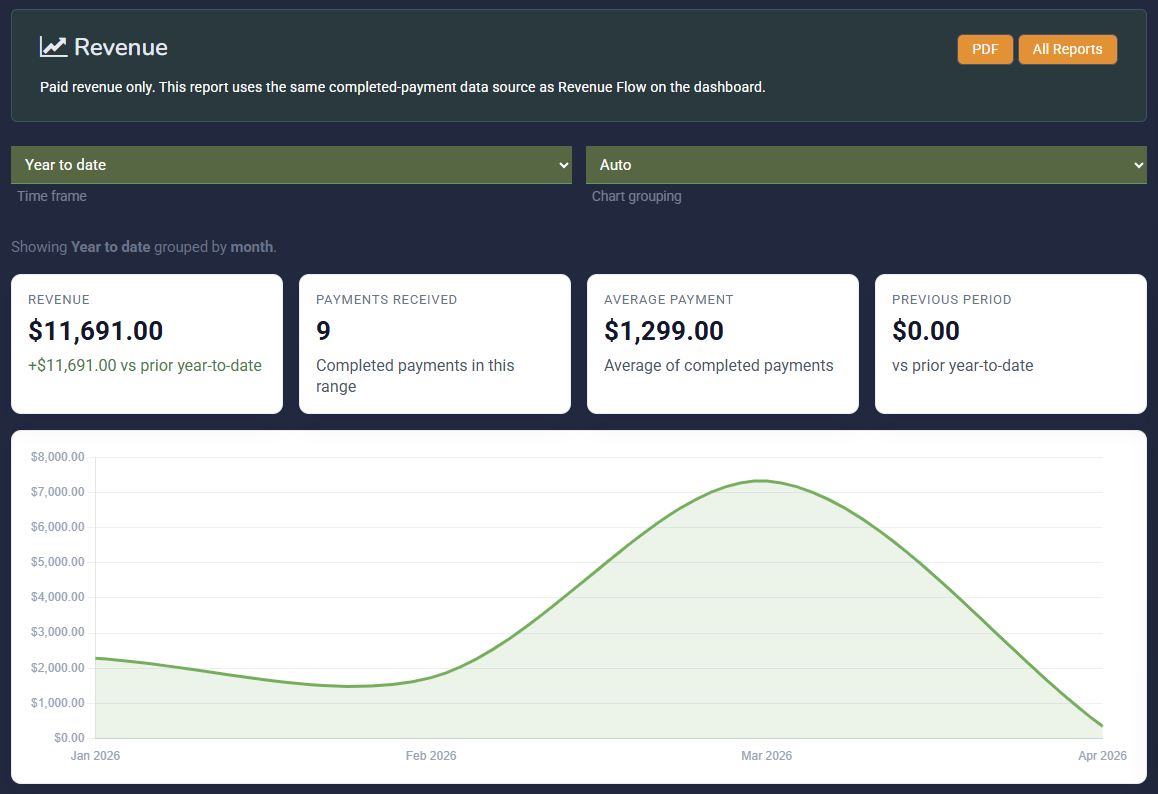
Instead of digging through lists, you can open focused reports for paid revenue, outstanding invoices, estimate conversion, and lead source performance.

  • See paid revenue over flexible time ranges
  • Review overdue and outstanding invoices in one place
  • Track estimate conversion instead of guessing close rate
  • See which lead sources are actually producing customers and revenue
  • Filter completed jobs by assigned user and see what is invoiced, collected, and outstanding

Need to check a crew member’s work? Work by User connects completed jobs to their current invoice and payment status. It is a work-and-payment report, not payroll or commission tracking.

Tree Service Software reporting page showing revenue, invoices outstanding, estimate conversion, and lead source reports

Built for Stump Grinding and Small Tree Service Crews

Tree Service Software is not a generic CRM with “tree service” painted on the side. It’s built for operators who spend most of the day on jobs, not in an office.

It’s a good fit for:

  • Stump grinding operators.
  • Small tree service crews.
  • Owner operators who also work in the field.

The focus is on simpler workflows, clearer screens, and fewer distractions so you can quote jobs, get approvals, and schedule work without a big onboarding project.

If you’re looking for a big, heavily configurable CRM for sales teams, dispatch centers, or multiple branches, this isn’t it — and that’s on purpose.

Built for

  • Solo operators
  • Small tree service crews
  • Stump grinders who live in the field

Not built for

  • Big sales teams
  • Dispatch centers
  • Multi branch enterprise setups

Why Tree Service Companies Switch to Tree Service Software

Tree service and stump grinding businesses usually come from one of three places: trying to run everything out of spreadsheets and texts, fighting with a general purpose field service tool, or outgrowing a simple job board and calendar.

They switch to Tree Service Software because:

No per user or “per tech” pricing

One flat plan covers your whole small team (up to a reasonable number of users). You don’t need a calculator to decide whether you can add a helper or someone in the office.

No sales team features you don’t need

Tree Service Software doesn’t try to be a sales pipeline manager. It assumes you have customers, jobs, and a crew that needs to know where to go and what to do.

No disconnected tools for texting, estimating, and invoicing

Instead of separate tools for texting, estimating, scheduling, and invoicing, Tree Service Software keeps those pieces together so each job has one story from quote to payment, reminders, and review requests.

No bloated enterprise setup

There’s no six week implementation, mandatory training, or 200 field configuration panel. Most operators can create estimates, send them for approval, schedule jobs, and send invoices in the first session.

Closeout workflows built for small crews

These workflows keep the work moving after a customer says yes:

  • Convert approvals into jobs and invoices without rebuilding customer details.
  • Share secure payment links from the existing conversation thread.
  • Capture website leads into the same customer record with less manual setup.
  • Post completed jobs to social and request reviews without leaving your CRM.

Tree Service CRM FAQ

What is a tree service CRM?

A tree service CRM is software that helps tree service and stump grinding businesses manage customers, estimates, jobs, schedules, and invoices in one place. Unlike generic CRMs built for sales teams, a tree service CRM is focused on running jobs: sending estimates, tracking approvals, scheduling work, keeping notes and photos tied to jobs, and making sure you get paid.

Who is Tree Service Software a good fit for?

It is a good fit for owner-operators and small crews who want estimating, approvals, jobs, texting, and invoicing in one system without enterprise complexity.

Who is Tree Service Software not a good fit for?

If you need a heavy dispatch system, deep multi-branch admin controls, or a CRM designed mainly for large office teams, this is probably not the best fit.

What changes if we switch from Jobber?

The biggest difference is that Tree Service Software is built for small crews who want a faster path from estimate to approval to payment, without as much overhead, upselling, or extra setup.

Can a tree service CRM handle estimates and invoices?

Yes. You can build a full path from quote to payment in one place: capture estimate details, send for approval, convert to job, and issue an invoice tied to the same work record without retyping.

Do I need technical experience to use a tree service CRM?

No. Tree Service Software is built with the assumption that most of your time is spent on site, not learning software. The interface is straightforward and focused on the next job, not technical settings.

Can I use Tree Service Software from my phone on the job?

Yes. Tree Service Software works well on phones and tablets, so you can create and send estimates, see messages and approvals, and check job details and schedules while you’re on the property.

Is Tree Service Software designed for small crews?

Yes. Tree Service Software is designed primarily for solo operators and small tree service crews who need reliable, job-focused management without enterprise complexity.